I built an open-source AgentMail alternative on Cloudflare Workers
A self-hosted email API for AI agents, on your own Cloudflare account. Every agent gets its own inbox, receiving costs nothing, and nothing is billed per mailbox.


tldr: dearagent.sh is an open-source, self-hosted email inbox API for AI agents, the alternative to AgentMail that runs on your Cloudflare account. Receiving costs nothing, and you are never billed per inbox or per domain. This is why I built one instead of buying one, what it actually costs, and how to run it.
This post answers a question I had to settle at both companies I work on: when your agents need email, where should that email live? I built dearagent.sh to answer it, and it now runs in production at Bug0 and Hashnode. The short answer is that receiving mail on Cloudflare is free, neither an address nor a domain is a billable unit, and whatever those inboxes end up holding stays in a database you own.
Bug0 runs about 5,000 browser tests a day. Most suites have a signup in them somewhere, and a signup ends the same way every time: a six-digit code, sent to an address, and a run that stops until someone reads it. A test that cannot read that mail cannot check the flow that sent it.
So the agents need mailboxes. One mailbox shared across every run does not work: runs overlap, and a test reads a verification code that belongs to a different run. Each run needs an address of its own. Thousands of them, used once and thrown away.
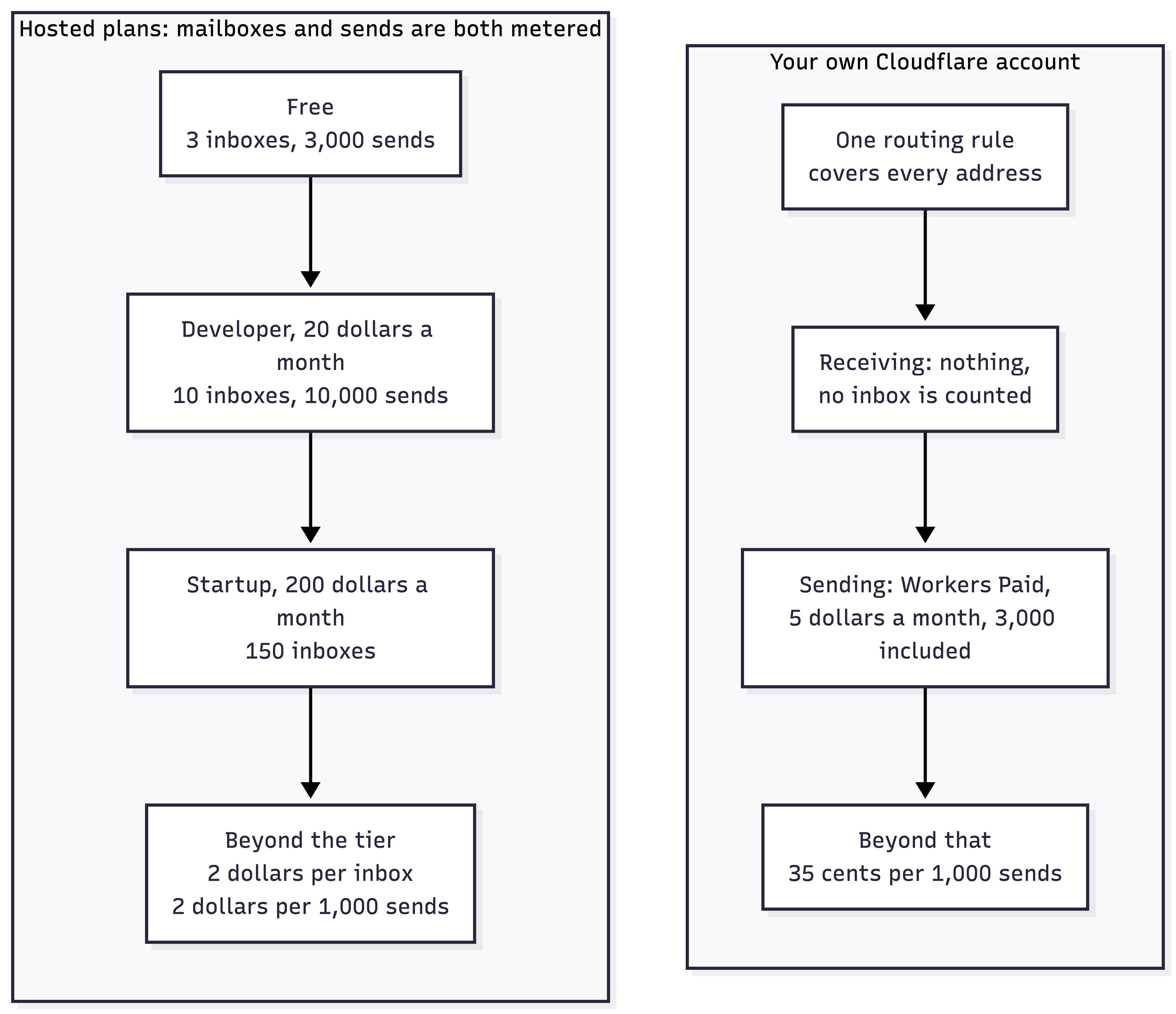
Hosted services for this exist and they work. They also cap how many inboxes you get, and charge for each one past the cap. AgentMail's published plans are three inboxes free, ten on the $20 Developer plan and 150 on the $200 Startup plan, with extra inboxes at $2 a month each and custom pricing above that. Custom domains are metered the same way: ten on Developer, 150 on Startup, and the same $2 a month for each one after that.
On a domain with a catch-all rule, creating an inbox means writing a string into a table, and adding a domain means adding a line to a config file. That is the part I could not get past. Neither one costs anything to make, and the plans I looked at charged for both.
So I built the version that runs on my own account.
What it is
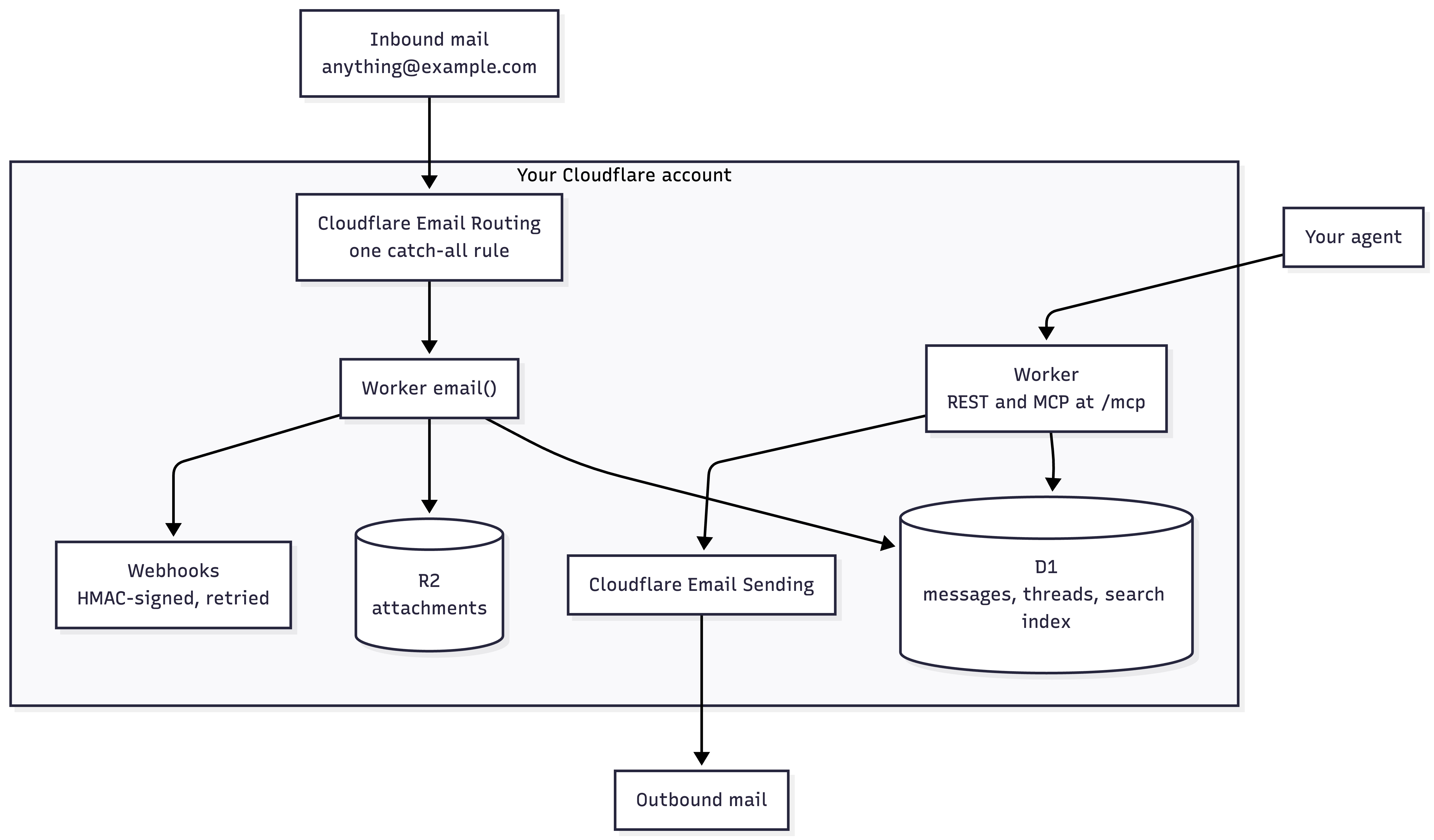
dearagent gives every agent its own inbox on your Cloudflare account. One Worker receives the mail, stores it in D1, puts attachments in R2, and hands it to the agent over REST or MCP. The same Worker sends: compose, reply, reply-all and forward all go out through Cloudflare Email Sending, with the threading headers set and the original quoted the way a mail client would.
> create_inbox {}
✓ agent-k3m9x2pq@mail.example.com

# hand the address to the signup form

> wait_for_message { inbox: "agent-k3m9x2pq@mail.example.com", timeout: 25 }
✓ from: Pied Piper <no-reply@piedpiper.example>
  subject: Your verification code
  text: "Your code is 493021. It expires in 10 minutes."
An email API for AI agents gives a program its own mailbox and a way to read what arrives, wait for a specific message and reply to it, with no human and no mail client in the loop. The same operations exist over REST, and the MCP server at /mcp lets Claude Code or Cursor use an inbox as a tool.
Why the mail should sit in a database you own
An agent's inbox is not a log of what happened. It is the recovery channel for every account that agent owns. Whoever can read it can reset every one of those passwords.
The metal box bolted to the front of a house works the same way. It is where the bank sends a replacement card, which is why stealing physical mail is worth a thief's afternoon. Nobody treats it as storage. It is a key cabinet that happens to receive paper.
Multiply one of those inboxes by every agent you run and it becomes the most sensitive store you have. So the question is not how well that store is run. It is whose system it sits in. With a hosted service the answer is theirs: their database, their schema, their retention policy, and their answer when you ask for something to be deleted. Run it on Cloudflare and the answer is yours. The mail lands in a D1 database on your own account, where you can read the schema, set the retention window and drop the table.
That is what I mean by data conscious, and it is why the project exists.
What it costs
Cloudflare Email Routing is free and unlimited on both the Workers Free and Workers Paid plans. A domain can hold 200 routing rules, and the catch-all is one of them, so a single rule covers every address on the domain.
So receiving costs nothing, whatever number of addresses you put behind it.
Sending is a separate product and it runs the same way. Workers Paid is $5 a month with 3,000 emails included, then $0.35 per 1,000. The hosted plans include 3,000 sends free and 10,000 on the $20 tier, and charge $2 per 1,000 beyond that.
So below 3,000 sends a month their free tier is cheaper than my five dollars, and I would use it. Above that the marginal thousand costs $0.35 instead of $2, which is most of a sixfold difference and it widens the whole way up. Both of my deployments only receive, so I am quoting the rate card rather than my own bill here.
The ceiling is the database, not the mailboxes. D1's free tier allows 100,000 row writes a day against 5 GB of storage, and each inbound message writes several rows: the message, the thread, the full-text index, one per attachment. Writes run out first on a busy ingest path, and paid D1 then bills reads and storage alongside them, so search costs something too. I expect that to be the first line anyone here actually pays, and none of it is priced per mailbox.
The free plan comes with one caveat. The handler is still a Worker, so it gets 10 ms of CPU, and Cloudflare warns that a large or heavy message can exceed it. Parsing a big MIME tree is the case to watch.
A hosted plan bills the mailbox. Cloudflare bills the work the mailbox causes. At ten inboxes that barely matters. At a few thousand it is the difference between a line item and a conversation with a sales team.
Domains follow the same pattern, at a smaller scale. EMAIL_DOMAINS takes a list, and the catch-all covers every address on each one, so a second domain is a config change rather than a plan change. If you want addresses at a client's domain, or a domain per product, per tenant or per environment, that is where the difference shows up fastest.
None of this makes the hosted option wrong. AgentMail raised a $6M seed round and has people whose job is keeping the service up, handling deliverability and answering support tickets at two in the morning. I am not pretending that is free. If you want an agent inbox this afternoon and you want someone else on call for it, buy theirs.
| Hosted inbox APIs | dearagent | |
|---|---|---|
| Where the mail lives | Their database | Yours: D1 for messages, R2 for attachments |
| What an inbox costs | A slot on a plan, counted and billed | A string in a table, counted by nobody |
| Source | Closed | AGPL, with tests that run in the real Workers runtime |
| Tenancy | Hosted, with organization seats per plan | One key, full access. Put it behind your own auth for per-agent scoping |
| Receiving | Counted against the plan's monthly email allowance | Free and unlimited, on both the Workers Free and Paid plans |
| Custom domains | Ten on Developer, 150 on Startup, $2 a month for each one after | As many as you own, unmetered, provided each receives no mail today |
| Sending | 3,000 on Free, 10,000 on the $20 tier, $2 per 1,000 beyond | Workers Paid at $5, 3,000 included, $0.35 per 1,000 beyond |
| Retention | Set by the provider | Set by you: a retention window, per-address TTLs, a daily purge |
| What you can inspect | What the API returns | The schema, the rows, and the raw MIME if you switch it on |
| Changing how it behaves | A feature request | An edit to a Worker whose source you already have |
How it works
Email Routing takes over the MX records for a domain and delivers each message to a Worker's email() handler instead of to a mailbox. The catch-all is one line in wrangler.jsonc:
"addresses": ["*@example.com"]
Mail for a domain the deployment does not handle is rejected at SMTP time, so the sender gets a bounce instead of silence. An address nobody has created is treated differently. By default the inbox is made on first delivery, which is the point of the catch-all. Set ALLOW_UNKNOWN_INBOX to false and unknown addresses bounce too.
Everything else is accepted and parsed. The handler dedupes on Message-ID because mail servers retry, threads on In-Reply-To and References, writes the message and its search index row to D1 in one batch, puts attachments in R2 and fires an HMAC-signed webhook.
Before you deploy anything, you can watch that happen on someone else's deployment. dearagent.sh creates a real inbox for you on the public demo instance when the page loads. Send it an email from anywhere and watch it arrive on the page. Demo addresses live for fifteen minutes and demo mail is not kept.
Running your own is three commands:
git clone https://github.com/panda-sandeep/dearagent && cd dearagent
npm install
npm run setup
The setup script creates the D1 database and the R2 bucket, offers to generate the API key, enables Email Routing on your domain and deploys the Worker with the catch-all rule. You need Node 20 or newer with npx wrangler login already done, and an apex domain you can dedicate to this, meaning one that receives no mail today. Email Routing takes over its MX records, which is why it has to be a domain you are not already using for mail.
If you use Claude Code or Cursor, wiring the inbox in as a tool is one more command:
claude mcp add --transport http dearagent https://dearagent.<you>.workers.dev/mcp \
  --header "Authorization: Bearer $KEY"
The repo also ships a skill file that teaches an agent the loop: take an address, note the time, wait, read, act.
How I use it in my own products
At Bug0 the agents are test runs. Signups are only the start of it. Customers' apps send one-time codes, magic links, billing confirmations and payment receipts, and each of those is a flow somebody has to check. Each run takes a fresh address, hands it to the form and reads whatever comes back. Because the address carries a TTL in its name, that run's mail is marked to expire and the daily purge clears it, so nothing is shared between runs.
At Hashnode the direction is reversed. Hashnode sends magic links, notifications and newsletters all day, and the question is whether what left the system arrives and reads correctly. An agent creates an inbox, triggers the flow and checks what landed.
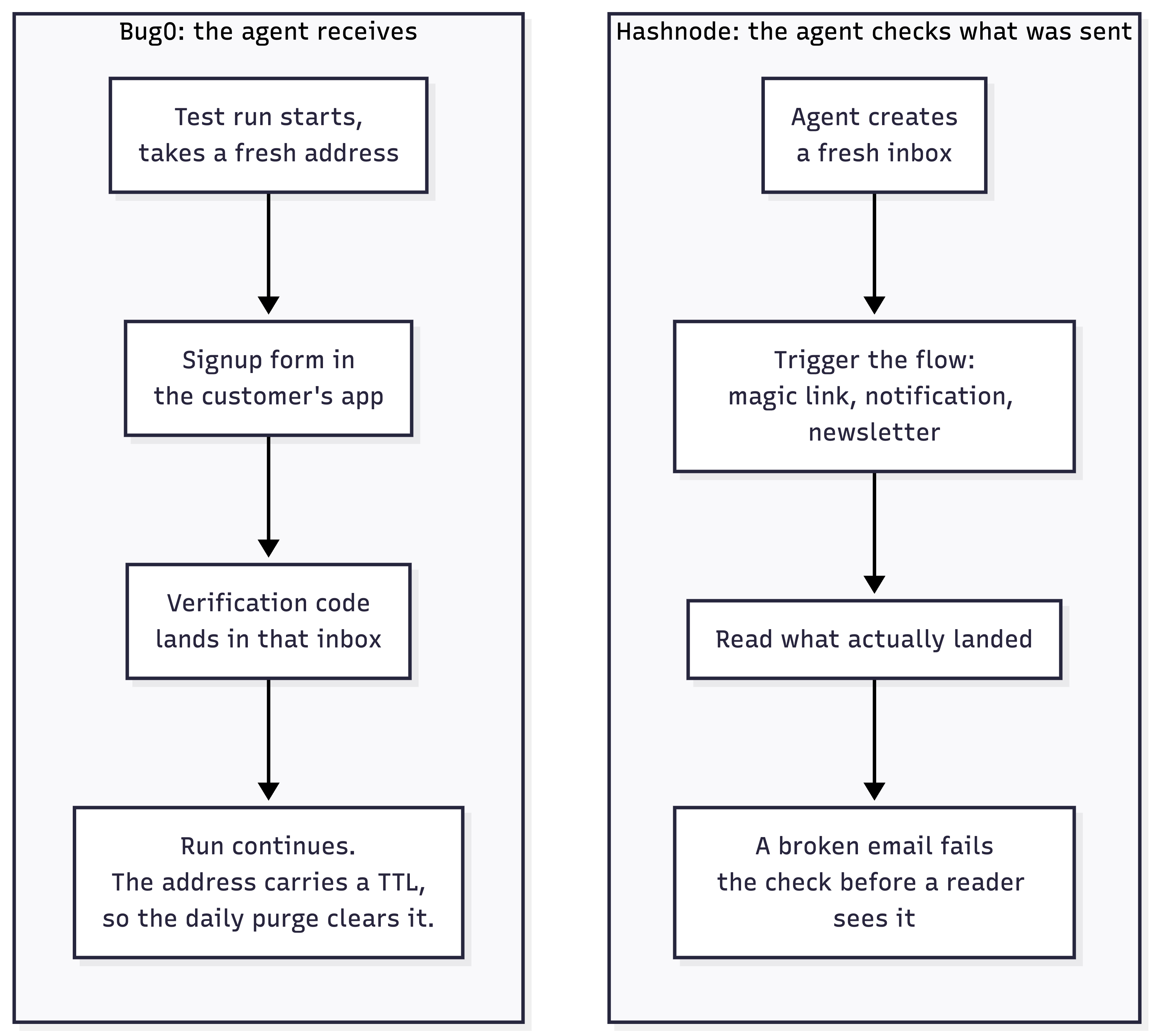
Each has its own deployment on its own domain with its own key. Both are the same Worker from the same repo.
What gets easy when inboxes are free
When inboxes cost money you ration them. When they cost nothing you stop, and a few ideas that looked wasteful start making sense.
- Verification codes, one-time passwords and magic links. The base case. An agent fills in a form, the service emails a six-digit code, and the agent reads the OTP and carries on instead of stopping for a person.
- An email testing API for end-to-end suites. Any Playwright, Cypress or Selenium suite with a signup, a password reset or a receipt in it. A fresh address per run means two runs never read each other's mail.
- Testing the transactional email your product sends. Trigger the magic link, the receipt or the newsletter, then read what actually arrived and whether it renders, before a reader finds the broken one.
- A temp mail API on a domain you own.
signup.ttl.600@marks that run's mail to expire and the daily purge clears it. You get temporary, disposable addresses without a public throwaway-mail service holding your test accounts, and they are at your domain rather than someone else's. - Replying in thread, not just collecting codes. Reply, reply-all and forward set the right headers, so an agent can carry a conversation rather than harvest the first message and stop.
- Receiving email as a webhook. Signed and retried on
message.received, so inbound mail starts work somewhere else instead of being polled for. - One email alias per service. Give every service you sign up for an address of its own. The day marketing mail turns up at the one you handed to a single company, you know exactly who sold the list. People with catch-all domains have done this by hand for years. An agent can do it for every signup it ever makes.
- The address as the routing key. dearagent already reads
ttl.600out of a local part. The same trick generalises:run-a91f3c@,ticket-4821@,tenant-acme@. The address carries the correlation, so whatever sent the mail never has to know your schema or call your API first. - An inbound API you did not have to build. Anyone with a mail client can put data into your system: invoices, receipts, scans, a photo of a receipt from a phone. The attachment lands in R2, the webhook fires, your code takes it from there. No portal, no OAuth, and email is the one protocol every company already lets through the firewall.
- Approval without a screen. An agent that needs a human decision sends the mail and waits on the reply in thread. That is an approval queue with no interface to design, answered from a phone at a bus stop.
- Watching things quietly. Throwaway addresses subscribed to changelogs, status pages and competitors' newsletters, with full-text search over all of it. Nothing connects the subscriptions back to you and the bill does not move.
- Two agents with no shared API. Both have addresses, so they can correspond, and threading on
In-Reply-Tokeeps the conversation state for free. It is slow and it is inelegant. It also works when you do not control the other side.
Hosted plans price a mailbox as though it were scarce. It is a row in a table, and most of that list is only interesting once you believe it.
The objections I had first
Why not Gmail? Gmail is a person's mailbox. An agent reaches it through an OAuth consent screen and one Google account per inbox, with limits built around a human reading mail. It does not survive contact with a thousand throwaway addresses.
Why not a sending API? SendGrid, Postmark and Resend are built around sending. Where they take inbound mail they hand you a webhook, which is a delivery mechanism rather than a mailbox an agent can ask about thirty seconds later. You also do not need one alongside this: the same Worker sends, and past 3,000 a month it does it for less.
Why not AgentMail, or one of the other hosted ones? They are the right shape, and for most people they are the right answer. I wanted the mail in my own database and I did not want an inbox to be a billable unit, which is the argument above and the reason this exists at all.
Why not build it yourself? That is what this is. The receive path is about two hundred lines, which is small enough to read in a sitting and decide for yourself whether you trust it with a password reset. The tests run inside the Workers runtime with the D1 migrations applied and R2 emulated, so what passes locally is what runs once deployed.
Where it will break first
Run the enable command on a domain that already gets its mail somewhere else and Cloudflare turns you down:
npx wrangler email routing enable example.com
# Non-Cloudflare MX records exist
There is no flag for this. Email Routing has to own the domain's MX records, and it will not take them from a provider that is still delivering to a real person's mailbox. Onboarding writes MX on the apex, so a subdomain is not a way round it: you cannot keep Google Workspace on example.com and receive at mail.example.com. Subdomains are for adding names to a zone Routing already owns.
Use an apex domain that receives no mail today. Sending has no such restriction and works from any domain or subdomain you verify.
What it does not do yet
It works end to end, but it has not had an in-depth audit and the API may still change. Read the code before you point it at anything sensitive.
It is single tenant. One API key grants access to every inbox on the server. If several agents or people share a deployment, put it behind Cloudflare Access or your own gateway.
And a rule that applies to every agent inbox, hosted or not: anything an agent can read from an inbox, a sender can put there. Treat inbound mail as untrusted input.
The code is at github.com/panda-sandeep/dearagent. The next thing I am building is a hosted version of it, for people who want the same inbox without running the Worker themselves. The self-hosted one stays open source either way.
If you run agents that sign up for things, give them addresses you own.
FAQ
What is the best email service for AI agents?
It depends on who you want running it. AgentMail is hosted, with plans, support and a team on call. dearagent is open source and runs on your Cloudflare account, so the mail and the bill are both yours. Both give an agent its own inbox with an API and an MCP server.
How do I set up dearagent?
Clone the repo, run npm install and npm run setup. You need a Cloudflare account and an apex domain that receives no mail today.
Is there an open-source AgentMail alternative?
dearagent is an open-source alternative to AgentMail. It runs on your own Cloudflare account, receives on a catch-all domain so you are never billed per inbox, and the source is AGPL. AgentMail is the hosted option and remains the right answer if you want someone else on call.
Does it work with Claude Code and Cursor?
Yes. The Worker exposes an MCP server at /mcp with fifteen tools. Add it with claude mcp add --transport http and the bearer key. The repo ships a skill file that teaches an agent the wait-then-read loop.
dearagent is open source under the AGPL-3.0 license.